


Cloud adoption is now the default choice for most companies. From startups to large enterprises, teams rely on AWS, Azure and Google Cloud to run applications, store data and scale faster. The convenience is real, but so are the risks. As cloud environments grow more complex, attackers have also evolved their strategies.
This is where cloud security testing becomes essential. It helps you validate your cloud setup, find gaps early and strengthen your security posture before something goes wrong.
Let’s break down why it matters and what it includes.
Why Cloud Security Matters Today

The cloud has changed how companies work, but it has also introduced a new category of threats. Today, most breaches don’t happen because of hackers bypassing cloud providers. Instead, they happen because of misconfigurations, over-permissive access and human errors.
A few reasons cloud security is more critical than ever:
1. Misconfigurations are the number one cause of cloud breaches
Simple issues like a public S3 bucket, open database port or weak IAM policy can expose sensitive data.
2. Identities have become the new attack surface
Attackers no longer need to break in. They find or steal credentials and move laterally inside the cloud.
3. Multi-cloud complexity is growing
More environments mean more settings, more identities and more chances for mistakes.
4. Compliance expectations are tighter
SOC2, ISO 27001, RBI, HIPAA and GDPR now require proof of regular cloud security checks.
5. Attackers target cloud-native services
They exploit serverless functions, Kubernetes clusters, APIs and CI/CD pipelines.
This is why companies need structured, recurring cloud security testing.
Understanding the Shared Responsibility Model
One of the biggest misconceptions businesses face is believing that cloud providers handle all security. They don’t.
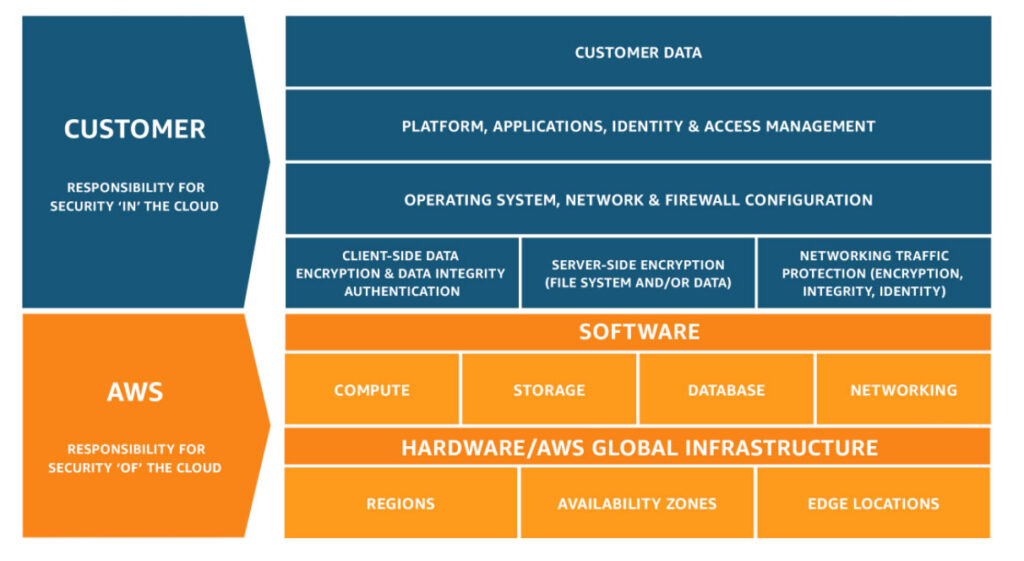
The shared responsibility model splits duties between you and your cloud provider.
Cloud Providers (AWS, Azure, GCP) are responsible for:
- Physical infrastructure
- Networking, hardware and server maintenance
- Virtualization and core cloud services availability
You are responsible for:
- Your data
- Identity and access control
- Configuring cloud services securely
- Network rules, encryption, logging and monitoring
- Application security
Most breaches occur on the customer side because of incorrect settings, weak access rules or insecure workloads. Cloud security testing ensures these issues are caught early.
Common Threats in AWS, Azure and Google Cloud

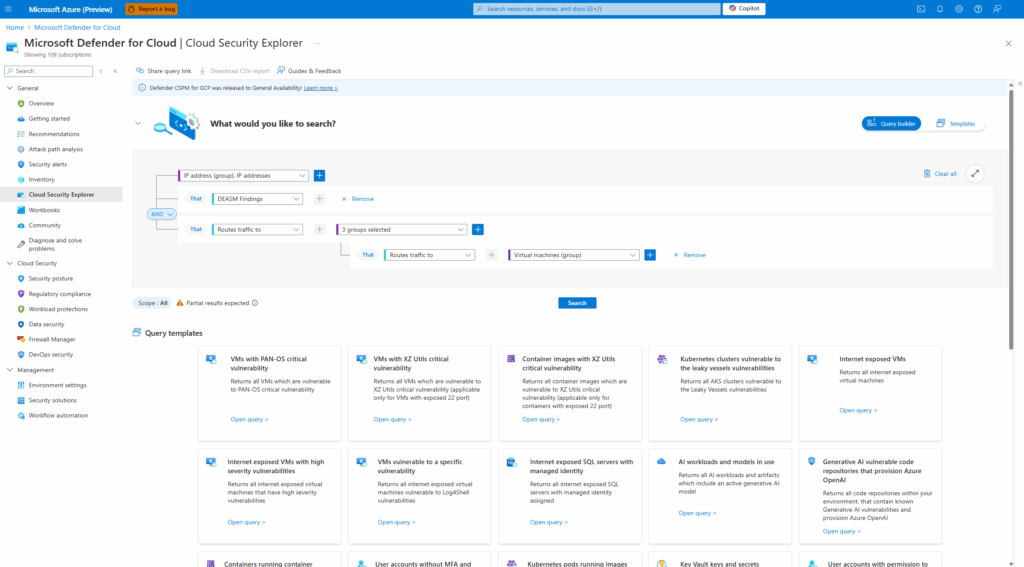
Although each platform has its own tools, the nature of the threats remains similar.
1. Misconfigured Storage Buckets
Public S3 buckets or Azure Blob containers exposing sensitive files.
2. Weak IAM Permissions
Users or roles with admin-level access they don’t need.
3. Exposed Databases
RDS, Cloud SQL or Cosmos DB being reachable from the internet.
4. Lack of MFA
Accounts without multi-factor authentication make credential theft easy.
5. Insecure APIs
Unprotected or unauthenticated endpoints in cloud apps.
6. Overlooked Logging and Monitoring
CloudTrail, Azure Monitor or GCP Logging not configured properly.
7. Vulnerable Serverless Functions
Lambda, Azure Functions and Cloud Functions abused through insecure triggers.
8. Kubernetes Misconfigurations
Open dashboards, unsecured kubelets and overly broad pod permissions.
Cloud security testing helps uncover all of these issues through a structured assessment.
What Cloud Security Testing Includes
Cloud security testing covers multiple layers of your environment. A complete assessment typically includes:
1. Cloud Configuration Review
Evaluates IAM, networking, storage, encryption, key access, secrets management and monitoring.
2. Cloud Vulnerability Assessment
Scans cloud services for known vulnerabilities and misconfigurations.
3. Cloud Penetration Testing
Simulates real attacks on your cloud services to find risks that scanners miss.
4. Identity and Access Management (IAM) Review
Checks permissions, roles, policies and privilege escalation paths.
5. Kubernetes and Container Security Testing
Inspects clusters, pods, images and pipelines for weaknesses.
6. Serverless Security Testing
Analyzes functions, triggers and event-based workflows.
7. Compliance Mapping
Aligns AWS/Azure/GCP configurations with frameworks like SOC2, ISO, HIPAA or RBI.
The goal is simple: identify gaps, validate your cloud posture and help your team secure the environment.
How Cloud Security Testing Differs from Traditional Testing
Traditional security testing focuses on networks, servers and applications hosted on-prem or in data centers. Cloud environments work differently, which means testing is different too.
Here’s how:
1. No direct access to infrastructure
You can’t test hardware or hypervisors. Providers control that layer.
2. Identity becomes the main attack surface
Excessive permissions can lead to privilege escalation.
3. Misconfiguration is a major risk
Cloud settings and service permissions replace traditional firewall and OS-level security.
4. Multi-layered services
APIs, serverless apps, managed databases and Kubernetes clusters add new complexity.
5. Provider policies matter
AWS, Azure and Google Cloud have rules for pentesting. You must follow allowed testing guidelines.
6. Shared responsibility remains central
You test the parts you own, not the provider’s infrastructure.
This makes cloud security testing a specialized process that demands cloud-specific tools and expertise.
Why Every Business Needs Regular Cloud Security Assessments
Cloud threats evolve fast. New services, new APIs and new configurations appear every month. Without regular assessments, small issues can turn into major exposures.
Regular cloud security testing helps you:
- Identify misconfigurations early
- Reduce risks from identity misuse
- Strengthen your cloud infrastructure
- Pass compliance audits smoothly
- Improve visibility across multi-cloud setups
- Build trust with customers and partners
If your business relies on the cloud, security testing isn’t optional. It’s a continuous process that protects your data, reputation and operations.